research (gbR)
On-demand options analytics, 30+ slash commands, 3D volatility surfaces, AI market assistants, and Discord automation across US optionable equities.
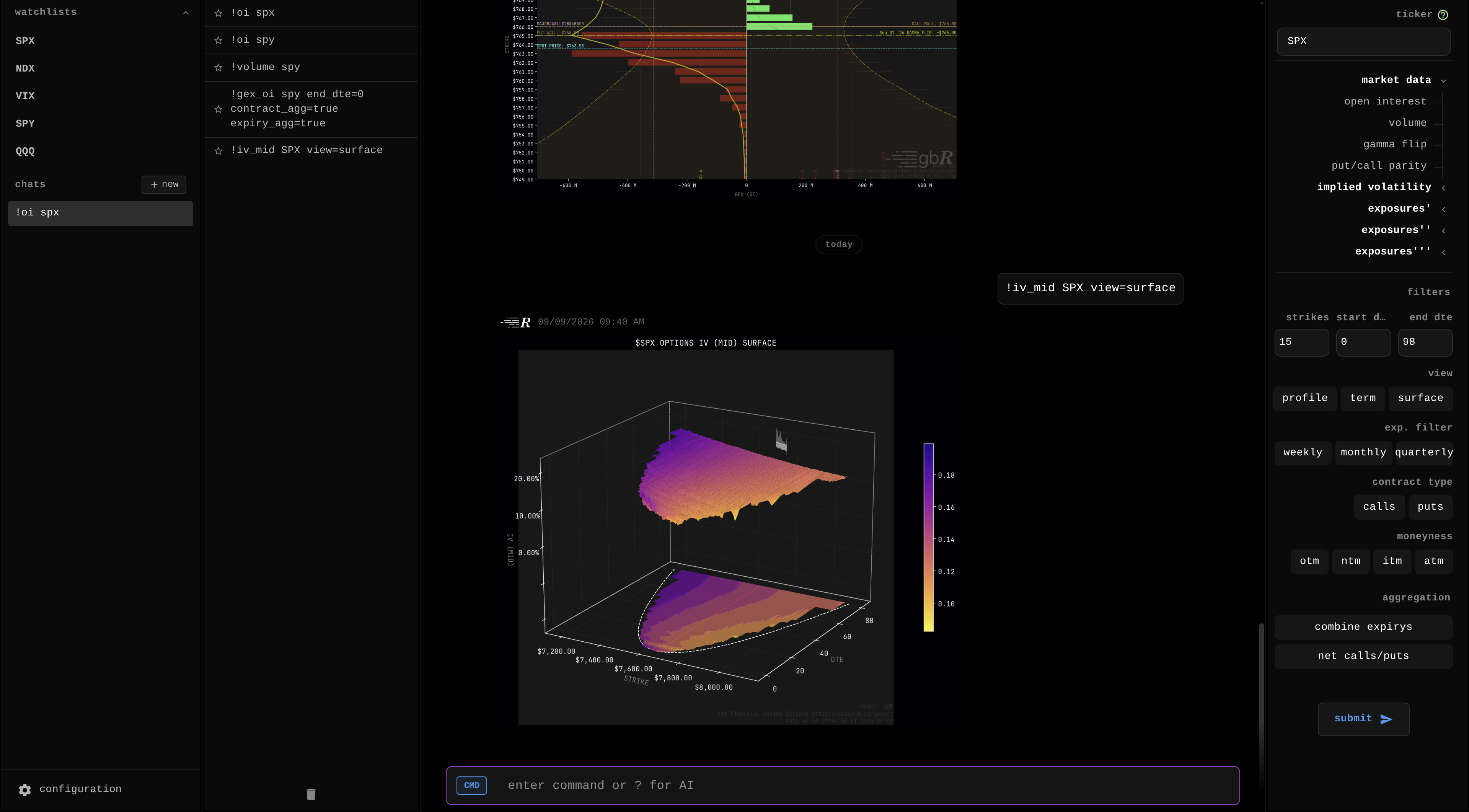
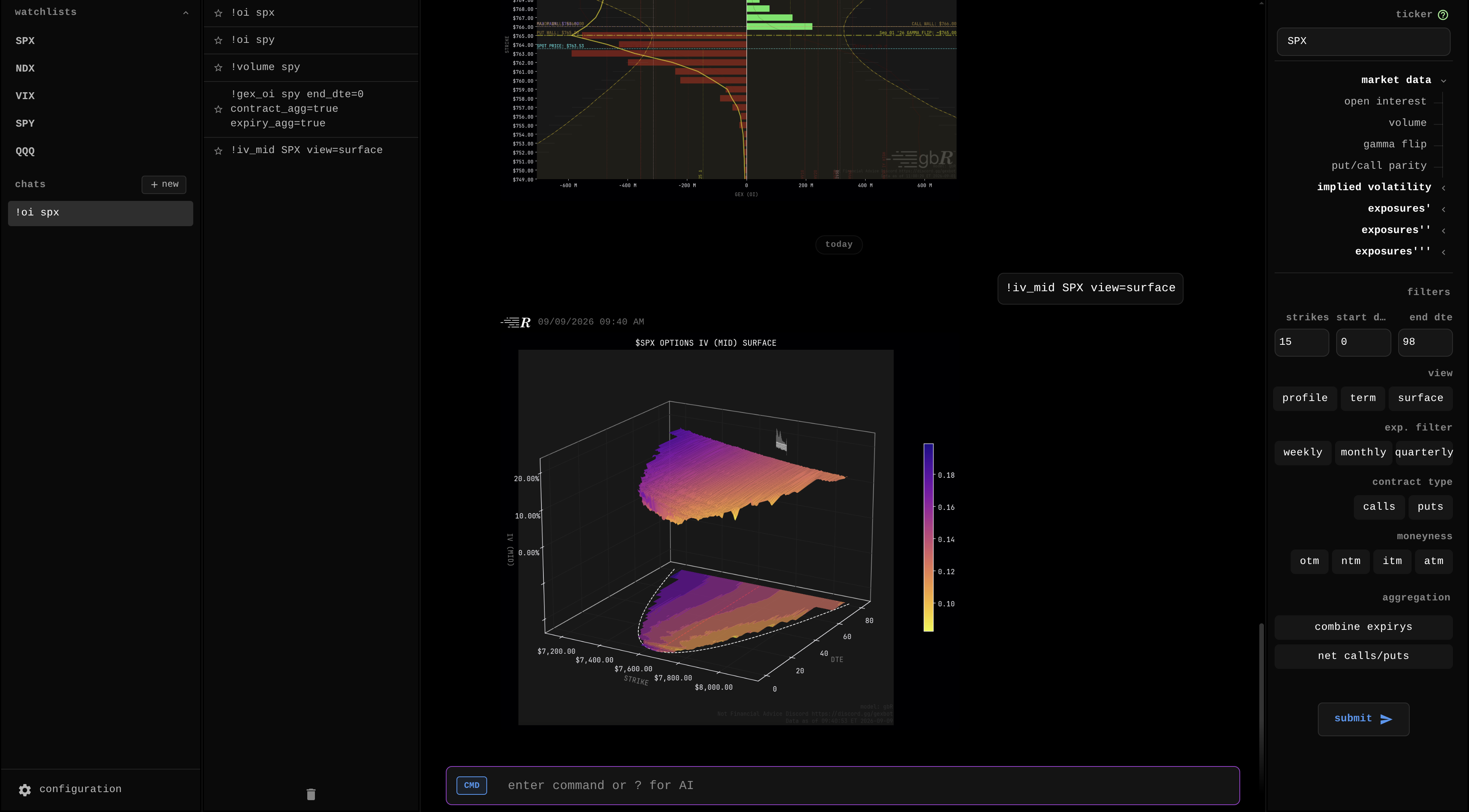
The gbR Research Platform is an on-demand options intelligence and analytics engine. While gexbot streaming packages (Classic, State, Orderflow) track live market microstructure, Research enables deep cross-sectional and historical options analysis across all US optionable equities, ETFs, and index options.
gbR Interactive Research Guide & Terminal
The comprehensive visual documentation, interactive parameter builders, mathematical formulas, and live web terminal are maintained directly on the platform.
Open Full Research Guide on gexbot.com ↗Operating Hours & Data Cadence
- Regular Market Hours (09:30–16:00 ET):
- Evaluates live option market quotes using the
gbRpricing model. - Caches requests on 15-minute floor intervals on-demand.
- Evaluates live option market quotes using the
- Index Option Extended Hours (16:00–16:15 ET):
- Index options (such as SPX and NDX) trade until 16:15 ET.
- Requests submitted at or after 16:15 ET include trades from this 15-minute post-close window.
- Premarket Hours (Before 09:30 ET):
- Open Interest (OI) refreshes daily at 08:00 ET.
- Calculations use previous session quotes under the
gbRmodel. The premarket cache refreshes once after 08:00 ET. - Option volume metrics remain offline until the market opens at 09:30 ET.
- After Hours, Final Snapshots & Weekends:
- The final scheduled End-of-Day (EOD) snapshot generates every evening at 23:00 UTC (19:00 EDT / 18:00 EST).
- After 17:00 ET, all after-hours queries return the stabilized closing snapshot from the session.
- Requests on weekends and market holidays return the cached snapshot from the previous trading session.
Option Expiration & Settlement Cadence
- Settlement Timestamps:
- AM-Settled Series: Standard monthly index contracts expire at 10:00 ET on their expiration date.
- PM-Settled Series: Daily and weekly equity and index contracts expire at 16:00 ET on their expiration date.
- Expired Series Filtering:
- Contracts drop immediately from active expirations and calculations once the market clock reaches their expiration timestamp.
- DTE resolution, exposure metrics, and visual charts exclude expired contracts automatically.
Delivery Surfaces
The gbR engine operates across three distinct delivery surfaces:
1. Web Terminal Workspace
- Interactive Command Palette: Run fast parameterized commands (
!gex SPX strikes=15,!surface NVDA,!gamma_flip QQQ). - AI Research Assistant: Multi-model LLM market reasoning (Claude, GPT, Gemini, Groq) equipped with tools to retrieve live market data and chart metrics.
- Real-Time Watchlists: Multi-asset monitoring tables with customizable columns and historical date/time scrubbers.
- Command History & Favorites: Star frequently used commands for rapid one-click re-execution.
- Zen Mode (
/zenmode): Collapse all side panels for a distraction-free analysis workspace.
2. gbR Discord Bot
- Native Slash Commands: Every metric is its own command —
/gex symbol:SPX,/iv mid symbol:SPY end_dte:30,/oi symbol:QQQ. Discord autocompletes the command, the symbol and every option. /helpInside Discord: Generated from the same catalog that registers the commands, so it never falls behind the bot.- Automated Watchlist Threads:
/watch ticker:SPXjoins this server's watchlist thread for a ticker, and creates it when it does not exist. - Server Administration: Manage guild authorizations, channel whitelisting, role gating, and daily usage quotas in the User Portal.
See the gbR Discord command reference for every command, option and default.
3. Programmatic REST API
- On-Demand Endpoints: Query charts, 3D volatility surfaces, and tabular datasets programmatically via
GET /research/{TICKER}/{METRIC}. - Supported Formats: Image asset descriptors (
webp,png,svg,jpeg,pdf) and raw data (json,csv).
Workspace Layout & System Commands
The Web Terminal interface includes a central conversation workspace and three configurable panels:
- Sidebar (Chats & Watchlists): Manage conversation sessions and stream real-time watchlist feeds.
- Tools Panel (Command Builder): Toggle between compact metric chips and an expanded parameter builder tree.
- Command History & Favorites Panel: Review executed commands, re-run queries, and manage starred favorites.
System Commands (/ Commands)
System commands control UI layout, conversation context, and AI providers:
| Command | Category | Description |
|---|---|---|
/zenmode | View Control | Toggles Zen Mode to hide all side panels and the top bar. |
/tools | View Control | Toggles visibility of the Tools panel (Command Builder). |
/chats | View Control | Toggles visibility of the Chats sidebar. |
/commands | View Control | Toggles visibility of the Command History panel. |
/topbar | View Control | Toggles visibility of the application top bar. |
/reset | View Control | Resets workspace layout and panel sizes to defaults. |
/newchat | Chat Control | Starts a new conversation context. |
/clear | Chat Control | Clears message history in the active conversation. |
/clear history | Chat Control | Clears command execution history. |
/clear all | Chat Control | Clears both messages and command history. |
/help | General | Displays keyboard shortcuts and system command reference. |
/docs | General | Lists all available research commands. |
/docs [command] | General | Displays detailed documentation for a specific command. |
/model [provider] | AI Settings | Switches active AI provider (groq, claude, gemini, openai). |
Global Parameter Taxonomy
Research commands accept optional key-value parameters using parameter=value syntax:
| Parameter | Type | Default | Accepted Values | Description |
|---|---|---|---|---|
view | string | skew | skew, term, surface, mirror (implied-volatility metrics only) | Sets chart visualization mode. |
type / draw_type | string | line (bar for oi, volume and exposure metrics; scatter for parity) | bar, line, histogram, scatter | Selects series rendering style. |
strikes | int | 15 (50 for oi and volume, 30 for exposure metrics) | Integer 5-250 (values outside the range are clamped) | Number of strikes displayed around spot price. |
start_dte | int | 0 | Integer 0-1000 | Start days-to-expiration horizon (inclusive). |
end_dte | int | 98 (365 for view=term, 64 for max_pain) | Integer 0-1000 | End days-to-expiration horizon (inclusive). |
expiration_filter | string | None | m (monthlies), w (weeklies), q (quarterlies) | Restricts calculations to specific expiration cycles. |
contract_filter | string | all | all, calls, puts | Filters contracts by option type. |
moneyness_filter | string | None | otm, ntm, itm, atm, d10, d15, d20, d25 | Filters contracts by moneyness or delta bucket. |
contract_agg | bool | true | true, false | true nets calls minus puts per strike. false plots calls positive and puts negative. |
expiry_agg | bool | false | true, false | true aggregates all expiries across each strike. |
skew_adj | bool | false | true, false | Adjusts Greek calculations for volatility skew. |
limit_y | bool | true | true, false | Clamps Y-axis scale to reduce outlier distortion. Send limit_y=false to disable the clamp. |
series | string | None | deltas, moneyness, strikes | For IV term view, plots term structure across delta tiers (5Δ, 20Δ, 30Δ, 50Δ). |
format | string | webp | webp, png, svg, jpeg, pdf, csv, json | Selects response output format. |
theme | string | dark | dark, light | Sets color palette for rendered chart assets. |
Comprehensive Command Catalog
All Greek exposure commands require a data source suffix:
_oi: Calculated from Open Interest._vol: Calculated from Intraday Volume._both: Calculated from Open Interest + Volume.
1. Market Data Commands
| Command | Title | Default Parameters | Description |
|---|---|---|---|
!oi [ticker] | Open Interest | strikes=50 view=skew start_dte=0 end_dte=98 | Displays Call OI (positive) and Put OI (negative) by strike. |
!volume [ticker] | Volume | strikes=50 view=skew start_dte=0 end_dte=98 | Displays session option trading volume by strike. |
!gamma_flip [ticker] | Gamma Flip | start_dte=0 end_dte=98 | Identifies gamma inflection level and tracks Gamma, Call, and Put Walls. |
!parity [ticker] | Put/Call Parity | view=skew start_dte=0 end_dte=98 | Plots call-put price spreads against theoretical fair value. |
2. Implied Volatility Commands
| Command | Title | Description | Key Visual Elements |
|---|---|---|---|
!iv_mid [ticker] | IV (Mid) | Plots implied volatility curve calculated at the mid-market price. | Smile curve, IV30/IV60 benchmarks, HV10–HV60 benchmarks, 1Y high markers. |
!iv_ask [ticker] | IV (Ask) | Plots implied volatility curve calculated at the ask price. | Shows ask-side volatility premium. |
!iv_bid [ticker] | IV (Bid) | Plots implied volatility curve calculated at the bid price. | Shows bid-side volatility discount. |
- Term Structure View (
view=term): Renders forward volatility curves (50Δ ATM, 25Δ skew wings, and VIX 24–37 DTE window). - 3D Surface View (
view=surface): Builds interactive 3D volatility surfaces across strikes and expiration dates.
3. Primary Greek Exposures (1st Order)
| Metric | Suffix Commands | Mathematical Definition | Financial Meaning |
|---|---|---|---|
| Delta (DEX) | !dex_oi, !dex_vol, !dex_both | Delta × S × 100 × Contracts | Dollar notional underlying share-equivalent exposure. |
| Vega (VEX) | !vex_oi, !vex_vol, !vex_both | Vega × 0.01 × 100 × Contracts | P&L sensitivity for every 1.00 point shift in implied volatility. |
| Theta (TEX) | !tex_oi, !tex_vol, !tex_both | (Theta / 365) × 100 × Contracts | Daily dollar decay (bleed) across the options complex. |
| Rho (RHO_EX) | !rho_ex_oi, !rho_ex_vol, !rho_ex_both | Rho × 0.01 × 100 × Contracts | Dollar sensitivity of option positions to a 1% change in interest rates. |
4. Secondary Greek Exposures (2nd Order)
| Metric | Suffix Commands | Mathematical Definition | Financial Meaning |
|---|---|---|---|
| Gamma (GEX) | !gex_oi, !gex_vol, !gex_both | Gamma × S² × 0.01 × 100 × Contracts | Notional gamma exposure; models market curvature and volatility dampening or acceleration. |
| Vanna | !vanna_ex_oi, !vanna_ex_vol, !vanna_ex_both | Vanna × S × 0.01 × 100 × Contracts | Delta sensitivity to IV changes (∂Delta / ∂IV). Predicts vanna flows. |
| Charm | !charm_ex_oi, !charm_ex_vol, !charm_ex_both | (Charm × S / 365) × 100 × Contracts | Delta sensitivity to time decay (∂Delta / ∂Time, Delta Bleed). |
| Vomma | !vomma_ex_oi, !vomma_ex_vol, !vomma_ex_both | Vomma × 0.01 × 100 × Contracts | Volatility convexity (∂Vega / ∂IV, Vol of Vol). |
5. Tertiary Greek Exposures (3rd Order)
| Metric | Suffix Commands | Mathematical Definition | Financial Meaning |
|---|---|---|---|
| Zomma | !zomma_ex_oi, !zomma_ex_vol, !zomma_ex_both | Zomma × S² × 0.01 × 100 × Contracts | Sensitivity of Gamma to changes in IV (∂Gamma / ∂IV). |
| Speed | !speed_ex_oi, !speed_ex_vol, !speed_ex_both | Speed × S³ × 0.01 × 100 × Contracts | Third-order price sensitivity (∂Gamma / ∂Spot, Gamma of Gamma). |
| Color | !color_ex_oi, !color_ex_vol, !color_ex_both | (Color × S² × 0.01 / 365) × 100 × Contracts | Rate of Gamma decay over time (∂Gamma / ∂Time, Gamma Decay). |
| Ultima | !ultima_ex_oi, !ultima_ex_vol, !ultima_ex_both | Ultima × 0.01 × 100 × Contracts | Third-order volatility risk (∂Vomma / ∂IV). |
Visual Elements & Chart Legend Statistics
Exposure charts display standard metrics and header statistics:
- Spot Price Line: Cyan dashed line showing underlying asset price.
- Expected Move (±1σ): Dotted bounds calculated as
Spot × (ATM_IV / 100) × sqrt(DTE / 365.25). - Gamma Flip: Yellow dash-dot line where cumulative Net GEX transitions across zero (
argmin(|cumsum(Net GEX)|)). - Gamma Walls: Highlighted major Call Wall (
argmax(GEX+)) and Put Wall (argmax(|GEX-|)). - Max Pain: Purple dashed line where total option intrinsic value is minimized (
argmin(sum(Intrinsic Value × OI))).
Summary Statistics
| Statistic | Calculation | Description |
|---|---|---|
| Metric Total | sum(Exposure) for expiry | Combined net exposure across all strikes in the expiration. |
| Chain % | (Expiry Abs / Chain Total Abs) × 100 | Relative weight of the expiration within the entire option complex. |
| Dominance [+ / -] | (Positive Exposure / Total Expiry Abs) × 100 | Percentage of positive exposure (calls/long) vs negative exposure (puts/short). |
| P/C Ratio | sum(Puts) / sum(Calls) | Ratio of total Put exposure to total Call exposure. |
| Sigma (σ) | ATM_IV × sqrt(DTE / 365.25) | One standard deviation expected move percentage. |
| Skew | IV(25Δ Put) - IV(25Δ Call) | 25-delta volatility smile slope. |
Discord Command Surface
The Discord bot exposes the same metrics as native slash commands. Each metric is its own command, and Discord autocompletes the command name, the symbol and every option:
/gex symbol:SPX                    gamma exposure, 0DTE, netted, all three weightings
/gex symbol:SPX weighting:volume   one chart, weighted by volume
/gamma exposure symbol:SPX         the same metric with nothing preset
/iv mid symbol:SPY view:surface    the 3D volatility surface
/oi symbol:QQQ strikes:40          open interest across 40 strikes
The legacy ! commands still run in Discord, and they are deprecated. Every ! reply names its slash
equivalent.
Read the full gbR Discord command reference — all 27 slash commands, the exposure
shortcuts and their presets, every option and filter, the symbol aliases, the rate limits, and the
complete legacy ! table with its synonyms and retired tokens.
AI Assistant Architecture
The gbR platform integrates conversational AI agents powered by a ReAct tool execution framework:
- Supported AI Providers: Groq, Anthropic Claude, Google Gemini, OpenAI ChatGPT.
- Automated Tool Execution (
fetch_market_metric): The assistant detects commands or natural language inquiries and fetches live charts or raw CSV metrics. - Multimodal Visual Reasoning: Users can pass rendered charts directly to the assistant for visual structure inspection and level interpretation.
- Data vs Image Modes:
format=webp(Default): Returns visual chart assets directly in the conversation.format=csv: Returns inline tabular data for quantitative synthesis, or generates a downloadable file export when requested.