Bookmap integration
Install and configure the official gexbot add-on suite for Bookmap featuring Orderflow, Classic, State profiles, and multi-profile charting.
The gexbot Bookmap Add-on Suite integrates real-time options market structure, Greeks, and orderflow analytics directly alongside Bookmap's depth-of-market (DOM) heatmap and volume bubbles. One package installs three add-ons:
gexbot orderflowstreams GEX, DEX, Convexity, Vanna, and Charm metrics into Bookmap subcharts.gexbot classicplots GEX Volume and Open Interest profiles, major levels, intraday major history, and a data table.gexbot stateplots Call/Put GEX, Delta, Gamma, Vanna, and Charm profiles.
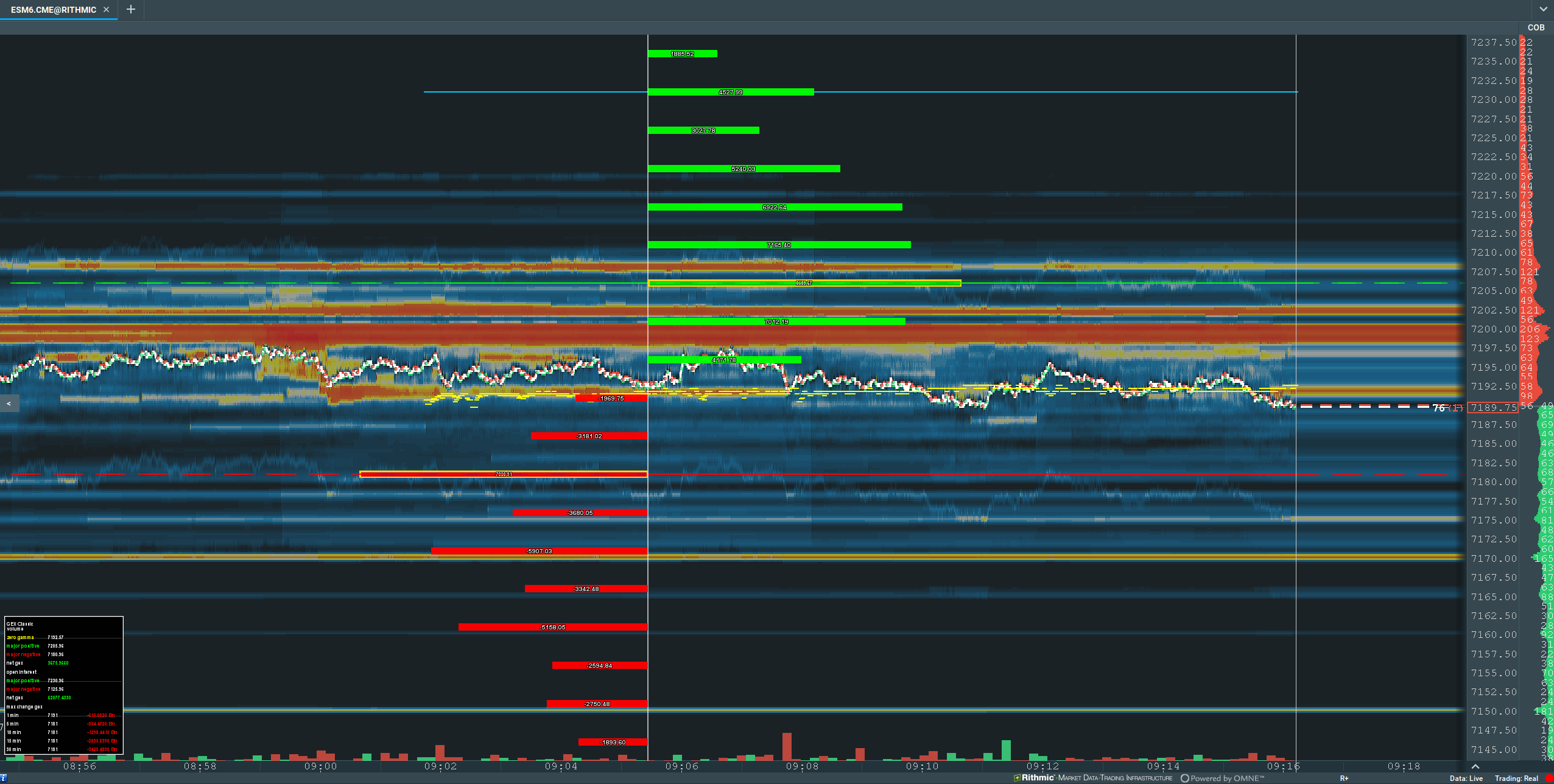
Add-on Features & Capabilities
- Live orderflow: Load the current session, stream updates over WebSocket, choose each visible metric, and control its color and axis scale.
- Multiple profiles: Plot multiple independent Classic or State profiles on one chart. Each profile has its own ticker, futures target, expiry, placement, and appearance.
- Configurable profiles and levels: Show Volume and OI ladders, Greek distributions, major levels, local extrema, data tables, and a dominant-major crossing alert.
- Reusable layouts: Save, import, export, apply, and undo profile presets. You can also set a default preset for new charts.
- Automatic futures conversion: Convert supported cash-index and ETF levels to the matching futures scale.
Requirements
- Bookmap 7.4.0.19 or higher
- Java 17+ runtime
- Active gexbot subscription with API access
- Your Bookmap API key from Connections
Installation & Setup
- Download Add-on:
- Install via the Bookmap Marketplace.
- Add to Bookmap:
- Start Bookmap and open the Settings → Manage Add-ons window.
- Click the Add... button and select the downloaded
.jarfile.
- Activate & Configure:
- Enable the add-on and confirm that Bookmap detects
gexbot orderflow,gexbot classic, andgexbot state. - Open the add-on for your package and paste your API Key into its Connection tab.
- Select the source ticker, for example
SPXorNDX. Set Futures Target toESorNQwhen the source levels need to align with a futures chart.
- Enable the add-on and confirm that Bookmap detects
The JAR registers three separately configured add-ons. Open Addons, select gexbot orderflow, gexbot classic, or gexbot state, and configure the current Bookmap chart.
One shared API key
The API key is shared by all gexbot add-ons and charts in the Bookmap process. Applying a new key in any gexbot add-on updates every loaded gexbot chart.
gexbot orderflow
The Connection tab controls the data source and WebSocket session. The Metrics tab controls the visible series, their colors, and the subchart scale.
Connection
| Setting | What it does |
|---|---|
| Ticker | Selects the source ticker for orderflow data, for example SPX or NDX. Changing it makes one new history request and connection attempt. |
| Futures Target (optional) | Sets the futures target associated with the stream and requests a supported source-to-futures conversion, for example SPX to ES. Exposure metrics remain exposure values. Leave it blank to use the source scale, and click Apply after changing it. |
| API Key | Sets the shared Bookmap API key. Enter the key and click Apply. This also refreshes the ticker list and makes one new connection attempt. |
| Reconnect | Reloads the current Orderflow session, then opens a new live WebSocket. The button has a five-second cooldown. |
Manual reconnection
The socket makes one connection attempt and does not reconnect automatically after a failure. Select Reconnect to try again. Each attempt reloads the current session before opening the live socket.
Axis Scaling
| Setting | What it does |
|---|---|
| Axis Mode | Auto adjusts the range from visible data. Manual captures the current range and keeps it stable during live updates. |
| Manual Axis Scale | Adds 1%–100% headroom to the captured manual range. 1% adds 1% space; 100% doubles the range. |
Metrics
Every metric row has a Show checkbox and a color selector. Latest refers to the nearest expiration; Next refers to the next expiration.
| Metric | What it shows |
|---|---|
| GEX Orderflow (Latest / Next) | Timestamped GEX orderflow for the nearest or next expiration. |
| DEX Orderflow (Latest / Next) | Timestamped DEX orderflow for the nearest or next expiration. |
| Convexity Orderflow (Latest / Next) | Timestamped Convexity orderflow for the nearest or next expiration. |
| Net GEX (Latest / Next) | Net GEX imbalance for the nearest or next expiration. |
| Aggregate DEX (Latest) | Cumulative DEX for the nearest expiration. |
| Aggregate Call DEX / Aggregate Put DEX (Latest) | Separate cumulative Call and Put DEX values for the nearest expiration. |
| Net DEX (Latest) | Net DEX exposure for the nearest expiration. |
| Net Call DEX / Net Put DEX (Latest) | Separate net Call and Put DEX values for the nearest expiration. |
| Net Vanna (Latest / Next) | Net Vanna exposure for the nearest or next expiration. |
| Net Charm (Latest / Next) | Net Charm exposure for the nearest or next expiration. |
| Net Convexity (Latest / Next) | Net Convexity exposure for the nearest or next expiration. |
gexbot classic
The top-level Connection, Profile, and Presets tabs apply to the current Bookmap chart. Inside Profile, each profile has its own Source, Style, Majors, Highlights, and Table tabs.
Connection and Profile Management
| Setting | What it does |
|---|---|
| API Key | Sets the shared Bookmap API key. Enter it first and click Apply. |
| Default profile | Holds the chart's first Classic profile. Use Show Profile in its Source tab to hide or show it without deleting its settings. |
| + Add Profile | Adds a named Classic profile. Start it from the current profile, the Default profile, or built-in defaults. |
| Remove Profile | Removes the selected additional profile. The Default profile cannot be removed. |
| Refresh All / Clear Cache | Clears rendered profile caches, redraws every profile, and reloads any enabled major history. |
Each Classic profile has an independent ticker, futures target, expiry, position, and style. Profiles may overlap if they use the same horizontal position.
Source
| Setting | What it does |
|---|---|
| Show Profile | Shows or hides the Default profile. Additional profiles use Remove Profile instead. |
| Ticker | Selects the symbol requested from the API, for example SPX. It is independent from the chart's Bookmap instrument. |
| Futures Target (optional) | Converts profile strikes and levels to a supported futures scale. Leave it blank to plot source prices. |
| Expiry | Selects Full (90-day aggregate), 0DTE, or 1DTE data for this profile. |
Style
| Setting | What it does |
|---|---|
| show GEX Volume | Shows the Volume-based GEX bars. |
| show GEX OI | Shows the Open Interest-based GEX bars. You can display Volume and OI together. |
| view values in bars | Prints each value inside its profile bar. |
| Bar Alignment | Left points every bar left, Right points every bar right, and Positive / Negative splits bars by sign around the origin. |
| Horizontal Position | Places the profile's origin at 0%–100% of the visible chart width. |
| Max Length | Sets the maximum profile-bar length in pixels. |
| Thickness | Sets each profile bar's thickness in pixels. |
| Bar Separation | Adds a vertical pixel offset between the Volume and OI bars at the same strike. |
| Transparency | Sets the bars' alpha value. Higher values make the bars more opaque; 255 is fully opaque. |
| Colors (+ / -) | Sets the positive and negative profile colors. OI uses darker versions of these colors when shown with Volume. |
| show center line | Shows the vertical line at the profile origin. Its nested controls set the line color and width. |
Majors
Classic provides five current horizontal levels.
| Level | What it plots | Intraday history |
|---|---|---|
| Zero Gamma | The zero-gamma flip level. | Yes |
| Major Positive by Volume | The major positive Volume GEX level. | Yes |
| Major Negative by Volume | The major negative Volume GEX level. | Yes |
| Major Positive by OI | The major positive Open Interest GEX level. | No |
| Major Negative by OI | The major negative Open Interest GEX level. | No |
Each current level has these controls:
| Setting | What it does |
|---|---|
| Horizontal Line | Shows or hides the current level. |
| Label | Shows or hides the level's name and converted price. |
| Color | Sets the current line and label color. |
| Line Style | Selects Solid, Dotted, or Dashed. |
| Line Style Width | Sets the current line width from 1–10 pixels. |
| Short Label Name | Replaces the full level name. Leave it blank to use the default name. |
| Label Position | Places this label independently at 0%–100% of the visible chart width. |
Zero Gamma and the two Volume majors also have history controls:
| Setting | What it does |
|---|---|
| Show History | Fetches and draws the current session's history for this level. The profile then appends live values as they arrive. |
| History Color | Sets this history series' color independently from the current level. |
| Historical Line Style | Selects Solid, Dotted, Dashed, or Scatter. |
| Historical Line Size | Sets line width or scatter-point radius from 1–10 pixels. |
Enabling history makes one request for the current session. Changing the profile ticker makes another request when at least one history series is enabled. Normal profile refreshes do not repeat the history request.
Dominant Major
The add-on estimates the absolute GEX around the positive and negative Volume majors and selects the larger one as the dominant major. This history contains only values received during the current add-on session.
| Setting | What it does |
|---|---|
| Show Live History | Draws the selected dominant major's live intraday path. |
| History Color | Sets the path color. |
| Historical Line Style | Selects Solid, Dotted, Dashed, or Scatter. |
| Historical Line Size | Sets line width or scatter-point radius from 1–10 pixels. |
| Alert when dominant major crosses spot | Enables a Bookmap sound alert when the dominant major moves from one side of spot to the other. |
| Alert Message | Sets the text used by the Bookmap alert. |
| Cooldown (seconds) | Sets the minimum time between alerts. 0 disables the cooldown. |
Highlights
| Setting | What it does |
|---|---|
| show max/min lines | Shows lines at the largest positive and negative values in each visible GEX profile. |
| GEX Volume Max/Min Lines | Sets separate positive and negative line colors and a Solid, Dotted, or Dashed style. |
| GEX OI Max/Min Lines | Sets the equivalent colors and style for the OI profile. |
| Max Border Colors | Shows or hides the positive and negative maximum-bar outlines and sets their colors. |
| 2nd Max Border Colors | Shows or hides the positive and negative second-largest-bar outlines and sets their colors. |
Table
| Setting | What it does |
|---|---|
| Show data table | Shows a profile summary with current majors, Net GEX, and recent maximum-change values. |
| Horizontal Position / Vertical Position | Places the table at 0%–100% of the visible chart width and height. |
| Cell Width / Cell Height | Sets the base dimensions of table cells in pixels. |
| Table Size | Scales the complete table and its font from 50%–200%. |
gexbot state
The top-level Connection, Profile, and Presets tabs apply to the current chart. The Profile tab contains the default Call/Put GEX profile, every additional State profile, and + Add Profile.
Connection and Profile Management
| Setting | What it does |
|---|---|
| API Key | Sets the shared Bookmap API key. Enter it first and click Apply. |
| + Add Profile | Adds a Call/Put GEX, Delta, Gamma, Vanna, or Charm profile with the selected expiry. Start from current profile style copies the current appearance when possible. |
| Show Profile | Shows or hides the default Call/Put GEX profile without deleting its settings. |
| Remove Profile | Removes the selected additional profile. The default Call/Put GEX profile cannot be removed. |
| Refresh All / Clear Cache | Clears rendered caches and redraws every Call/Put GEX and Greek profile on the chart. |
Profile Types
| Profile | Expiries | Major levels | Data table |
|---|---|---|---|
| Call/Put GEX | Full, 0DTE, 1DTE | Major Call by Volume and Major Put by Volume | Yes |
| Gamma | 0DTE, 1DTE | Major Long Gamma by Volume and Major Short Gamma by Volume | No |
| Delta | 0DTE, 1DTE | None | No |
| Vanna | 0DTE, 1DTE | None | No |
| Charm | 0DTE, 1DTE | None | No |
Select + Add Profile, choose the profile type and expiry, then choose whether to start from the current profile's style. You may add the same type and expiry more than once; Bookmap adds a number suffix when needed. Use Remove Profile to delete an additional profile. Use Show Profile to hide or show the default Call/Put GEX profile.
Source
| Setting | What it does |
|---|---|
| Ticker | Selects the symbol requested from the State API. Each profile has its own ticker. |
| Futures Target (optional) | Converts this profile's strikes and major levels to a supported futures scale. Leave it blank to use source prices. |
| Expiry | Selects Full, 0DTE, or 1DTE for Call/Put GEX. Greek profiles support 0DTE and 1DTE. |
| Profile Type | Changes an options profile among Delta, Gamma, Vanna, and Charm. Only Gamma profiles display a Majors tab. |
Style
All State profiles share these appearance controls.
| Setting | What it does |
|---|---|
| view values in bars | Prints each value inside its profile bar. |
| Bar Alignment | Left points every bar left, Right points every bar right, and Positive / Negative splits bars by sign. |
| Horizontal Position | Places the profile's origin at 0%–100% of the visible chart width. |
| Max Length | Sets the maximum profile-bar length in pixels. |
| Thickness | Sets each bar's thickness in pixels. |
| Transparency | Sets the bars' alpha value. Higher values make the bars more opaque; 255 is fully opaque. |
| Colors (+ / -) | Sets the positive and negative bar colors for this profile. |
| show center line | Shows the vertical line at the profile origin. Its nested controls set the line color and width. |
Majors
Call/Put GEX profiles provide Major Call by Volume and Major Put by Volume. Gamma profiles provide Major Long Gamma by Volume and Major Short Gamma by Volume. Each major has the same controls.
| Setting | What it does |
|---|---|
| Horizontal Line | Shows or hides the current major level. |
| Label | Shows or hides the major's name and converted price. |
| Color | Sets the major line and label color. |
| Line Style | Selects Solid, Dotted, or Dashed. |
| Line Style Width | Sets the line width from 1–5 pixels. |
| Short Label Name | Replaces the full major name. Leave it blank to use the default name. |
| Label Position | Places each label independently at 0%–100% of the visible chart width. |
Highlights
| Setting | What it does |
|---|---|
| show max/min lines | Shows lines at the profile's largest positive and negative values. |
| Max/Min Line Colors | Sets separate positive and negative line colors. |
| Max Line Style | Selects Solid, Dotted, or Dashed. |
| Max Border Colors | Shows or hides the positive and negative maximum-bar outlines and sets their colors. |
| 2nd Max Border Colors | Shows or hides the positive and negative second-largest-bar outlines and sets their colors. |
Call/Put GEX profiles also have a Table tab. Its Show data table, position, cell-size, and Table Size controls work like the Classic data-table settings.
Presets and Chart Inheritance
The Presets tab is available in gexbot classic and gexbot state. State presets include both Call/Put GEX and Greek profiles.
| Setting | What it does |
|---|---|
| Saved Preset / Apply to This Chart | Selects a preset and applies it only to the current chart. |
| Save Current as Preset | Saves the complete profile arrangement. Select Include ticker and futures target only when the preset should replace those source fields. |
| Set as Default for New Charts | Applies the selected preset when gexbot first sees a new chart alias. |
| Undo Last Apply | Restores the settings that existed before the last preset apply or Bookmap inheritance operation. |
| Rename / Delete | Renames or removes the selected preset. |
| Import Presets / Export Presets | Transfers the complete preset library through a properties file. |
Presets exclude the API key and generated profile identifiers. By default, applying a preset preserves each chart's ticker and futures target.
Bookmap's Inherit chart settings from... command copies the source chart's gexbot profile structure and appearance to the target chart. It preserves the target chart's ticker, futures target, API key, and generated profile identifiers. For a blank target source, inheritance maps ES or MES charts to SPX → ES, and NQ or MNQ charts to NDX → NQ. Other instruments remain blank.
New charts need a source
Classic and State profiles do not silently default to ES_SPX. Select a ticker unless a default preset supplies one or target-aware inheritance recognizes an ES, MES, NQ, or MNQ chart.
Futures Conversion
Ticker always selects the source data. A nonblank Futures Target requests a server-validated conversion and refreshes it every 15 minutes. A blank target leaves all strikes and levels on the source scale. If the pair is unsupported or a request fails, the add-on keeps source prices and records the reason in the Bookmap log.
See Futures Conversion for every supported source and target pair.
Automatic settings storage
The add-ons save each chart's settings automatically. Classic and State poll their profile APIs at a fixed one-second interval; they do not expose a refresh-interval setting.