Sierra Chart integration
Install and configure the official gexbot C++ custom study DLLs for Sierra Chart.
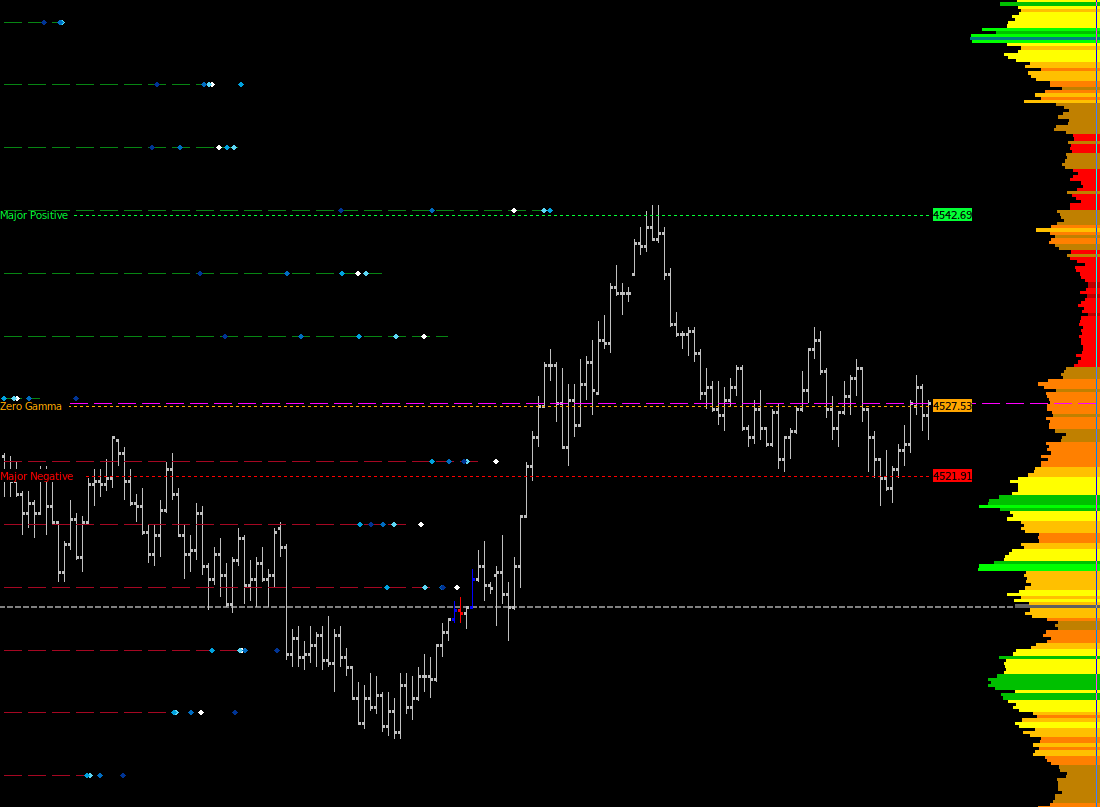
The gexbot Sierra Chart studies render live GEX/Greek profiles, Zero Gamma, and major levels directly on Sierra Chart intraday charts. Two 64-bit DLL variants are available. Install whichever one fits your setup. Both share the same configuration.
Requirements
- You need Sierra Chart, 64-bit.
- You need an active gexbot subscription with API access.
- You need your API key. Copy it from Connections.
Sierra Chart version
gexbot does not publish a strict minimum Sierra Chart build number. Any reasonably current 64-bit build works. If you run an older build and hit a load error, ask on the official gexbot Discord. A build compiled against an older Sierra Chart version can be provided on request.
Choosing a variant
| Variant | DLL | Best for |
|---|---|---|
| Standard | gexbot_v4_64.dll | Regular use, with fully configurable bar transparency. |
| Graphics | gexbot_v4_graphics_64.dll | A custom rendering engine that keeps small GEX bars visible instead of flattening them at extreme zoom or scale, plus separate horizontal and vertical major-label alignment and a label format option. See Major Lines below. |
Download the DLL
You can also find both variants on the official gexbot Discord or on gexbot.com.
Unblock it
If Windows blocks the file, right-click it, open Properties, check Unblock, and click Apply.
Copy it to your Data folder
Copy the .dll directly into your Sierra Chart Data folder, for example C:\SierraChart\Data\.
Add the study to your chart
Press F6, or go to Analysis → Studies, click Add Custom Study, select Gex Profile, and click OK.
Configure it
Open Settings & Inputs and paste your API KEY first. Nothing else works without it. Then continue with the Configuration tab above.
Rollback safety
The Standard and Graphics DLLs use independent internal identifiers, so you can keep an older version's DLL alongside a newer one in your Data folder and switch a chart back if needed. Sierra Chart treats them as separate studies.
Nothing showing up on your chart?
If the study loads but no profile or level appears, see Nothing is showing up on my chart in the FAQ tab above before contacting support.
Every setting below lives in the study's Settings & Inputs dialog, reached with F6 → Study → Settings. Sierra Chart shows all inputs in a single flat list. The groupings below are for readability only.
API & Data Source
| Setting | What it does |
|---|---|
| API KEY | Your gexbot API key. Paste it in first. Nothing else works without it. |
| Ticker (e.g. SPX, NDX, ES_SPX, NQ_NDX, SPY, AAPL...) | The symbol requested from the API. It is independent from the chart's own symbol. |
| Package | Classic combines Volume and Open Interest GEX (Naive GEX). State uses classified orderflow, which unlocks the Gamma and Delta options in Greek below. |
| Greek | 90d agg Gex, 0dte Gex, or 1dte Gex are available in either Package. 0dte/1dte Gamma and 0dte/1dte Delta are available in the State package only. |
| GEX Volume and/or OI Display | Volume, OI, or Both. This chooses which profile or profiles to draw when Greek is set to one of the Gex options. |
State package has no Open Interest data
If Package is State and GEX Volume and/or OI Display is OI or Both, the study logs "No State GEX OI Data, halting requests" and stops updating. Switch GEX Volume and/or OI Display to Volume, or use a Gamma/Delta option in Greek instead.
Gamma/Delta requires the State package
If Package is Classic and Greek is set to a Gamma or Delta option, the study logs "Gamma/Delta requires the State package" and stops updating. Switch Package to State.
Futures Conversion
| Setting | What it does |
|---|---|
| Futures Target (Auto-Convert, e.g. NQ, ES - blank disables) | The target futures contract for automatic price conversion. Leave it blank to disable. Levels then stay on the Ticker's own scale. |
| Set Multiplicative Futures Premium (Applied before Additive Premium) | The multiplier applied to convert to the target contract. It is overwritten automatically once a Futures Target is set, and is only editable manually while that field is blank. |
| Set Additive Futures Premium | Additive basis offset (e.g. the gap between SPX and the ES future). Same override behavior as the multiplier. |
Futures conversion cadence
When a Futures Target is set, the conversion refreshes automatically at startup, at 9:30 and 9:32 AM ET, and every 15 minutes after that.
Request Window
| Setting | What it does |
|---|---|
| Time Zone | Time zone used to evaluate the Request Start/End Time below. Defaults to New York. |
| Request Start Time / Request End Time | The daily window during which the study is allowed to request live data (defaults: 9:30 AM – 11:00 PM). Outside this window it stops updating. |
| Request Interval (seconds) | How often the study requests new data during the window above. |
| Allow Copy To Other Charts | Lets Sierra Chart's Copy Study feature duplicate this study onto other charts. |
| Logarithmic Scaling (Horizontal) | Draws the profile on a logarithmic horizontal scale instead of linear. |
Profile Layout
| Setting | What it does |
|---|---|
| Profile Direction | Direction bars grow from their origin: Right, Left, or Center (positive to the right, negative to the left, from a center point). |
| Bar/Prior Origin Position % (0-100) | Horizontal position of the bars' and prior dots' origin point, as % of chart width. |
| Bar Transparency (1 is opaque, 100 is transparent) | Bar transparency level. |
| Bar Width / Line Width (Tick Multiple) | Bar/line thickness, in tick multiples. |
| Bar Scale Factor (Window Width %) | Maximum bar length, as a percentage of chart window width. |
| Call/Put GEX Volume Bars Vertical Offset (Tick Multiple, Can Be Negative) | Shifts the Volume GEX bars vertically, in tick multiples. |
| Call/Put GEX OI Bars Vertical Offset (Tick Multiple, Can Be Negative) | Shifts the OI GEX bars vertically. |
| Delta Bars Vertical Offset (Tick Multiple, Can Be Negative) | Shifts the delta bars vertically. |
| Gamma Bars Vertical Offset (Tick Multiple, Can Be Negative) | Shifts the gamma bars vertically. |
Strike Filters
Each filter limits how many strikes are drawn on that side of a given profile. A value of 0 shows all of them.
| Setting | What it does |
|---|---|
| Filter Call GEX Volume / Filter Put GEX Volume: Show N Largest | Limits the Volume GEX profile to the N largest call/put strikes. |
| Filter Call GEX OI / Filter Put GEX OI: Show N Largest | Limits the OI GEX profile to the N largest call/put strikes. |
| Filter Long Delta / Filter Short Delta: Show N Largest | Limits the delta profile to the N largest long/short strikes. |
| Filter Long Gamma / Filter Short Gamma: Show N Largest | Limits the gamma profile to the N largest long/short strikes. |
Profile Colors & Styles
Each profile has a color and a line style (Line, Dot, Dash, or Bar) for its two sides.
| Setting | What it does |
|---|---|
| Call GEX Volume Color / Style, Put GEX Volume Color / Style | Volume GEX profile appearance. |
| Call GEX OI Color / Style, Put GEX OI Color / Style | OI GEX profile appearance. |
| Positive Delta Color / Style, Negative Delta Color / Style | Delta profile appearance. |
| Long Gamma Color / Style, Short Gamma Color / Style | Gamma profile appearance. |
Major Lines
Each major level has its own color, line width, and dash style (Solid, Dash, or Dot), plus a Show toggle.
| Line | Show setting | Default color |
|---|---|---|
| Zero Gamma | Show Zero Gamma | Orange |
| Major Call Vol | Show Major Call Vol | Green |
| Major Put Vol | Show Major Put Vol | Red |
| Major Call OI | Show Major Call OI | Green |
| Major Put OI | Show Major Put OI | Red |
| Major Long Gamma | Show Major Long Gamma | Cyan |
| Major Short Gamma | Show Major Short Gamma | Purple |
| Setting | What it does |
|---|---|
| Show Major Labels | Toggles the price labels on all seven major lines at once. |
| Major Label Alignment (Standard variant) | Where the label sits relative to its line: Left, Right, or Center. |
| Major Label Horizontal Align / Major Label Vertical Align (Graphics variant) | Independent horizontal (Left/Right/Center) and vertical (Top/Bottom/Center) label positioning. |
| Major Label Format (Graphics variant) | What the label shows: Name Only, Value Only, or Name & Value. |
| Major Label Font Size | Font size for the labels. |
| Major Label Transparent BG | Draws the label without a background fill. |
| Zero Gamma Label / Major Call Vol Label / Major Put Vol Label / Major Call OI Label / Major Put OI Label / Major Long Gamma Label / Major Short Gamma Label | Short tag text shown on each line's label (defaults: ZG, MCV, MPV, MCO, MPO, MLG, MSG). |
Prior Dots
These are small dots plotted at each strike, showing how its value has changed over the last few minutes. They give you a quick way to see where GEX, delta, or gamma is building up or fading, without waiting for the next refresh.
| Setting | What it does |
|---|---|
| Prior Dots Style | Shape used for every prior dot: Point, Diamond, or Square. |
| Prior Dots Size | Size used for every prior dot. |
| 1 / 5 / 10 / 15 / 30 Minute Prior GEX Color + Display toggle | Color and visibility of the GEX prior dot for each lookback window. |
| 5 / 15 / 30 Minute Prior Delta Color + Display toggle | Color and visibility of the delta prior dot for each lookback window. |
| 5 / 15 / 30 Minute Prior Gamma Color + Display toggle | Color and visibility of the gamma prior dot for each lookback window. |
gexbot Orderflow
gexbot Orderflow is a separate, companion study for Sierra Chart, installed the same way as the studies above. It streams a live orderflow feed rather than polling like the main study.
| Setting | What it does |
|---|---|
| API Key | Your gexbot API key. The same key used by the main study works here too. |
| Ticker | The symbol to stream. The list includes the major indices and futures (SPX, VIX, NDX, RUT, ES_SPX, NQ_NDX) along with a fixed set of individual stocks, for example AAPL, TSLA, NVDA, SPY, and QQQ. |
| Metric | Which flow to plot: Gex, Dex, or Convexity. |
| DTE | Whether the metric is calculated for options expiring today (0DTE) or the next expiration (1DTE). |
Related Documentation
Plot levels on futures charts
Show gexbot levels on your ES, NQ, or other futures chart with automatic futures conversion. Which Ticker and Futures Target to use, how it refreshes, and how to fix levels that do not line up.
NinjaTrader integration
Install and configure the official gexbot NinjaScript add-on for NinjaTrader 8.1+.