MotiveWave integration
Install and configure the official gexbot Java study for MotiveWave.
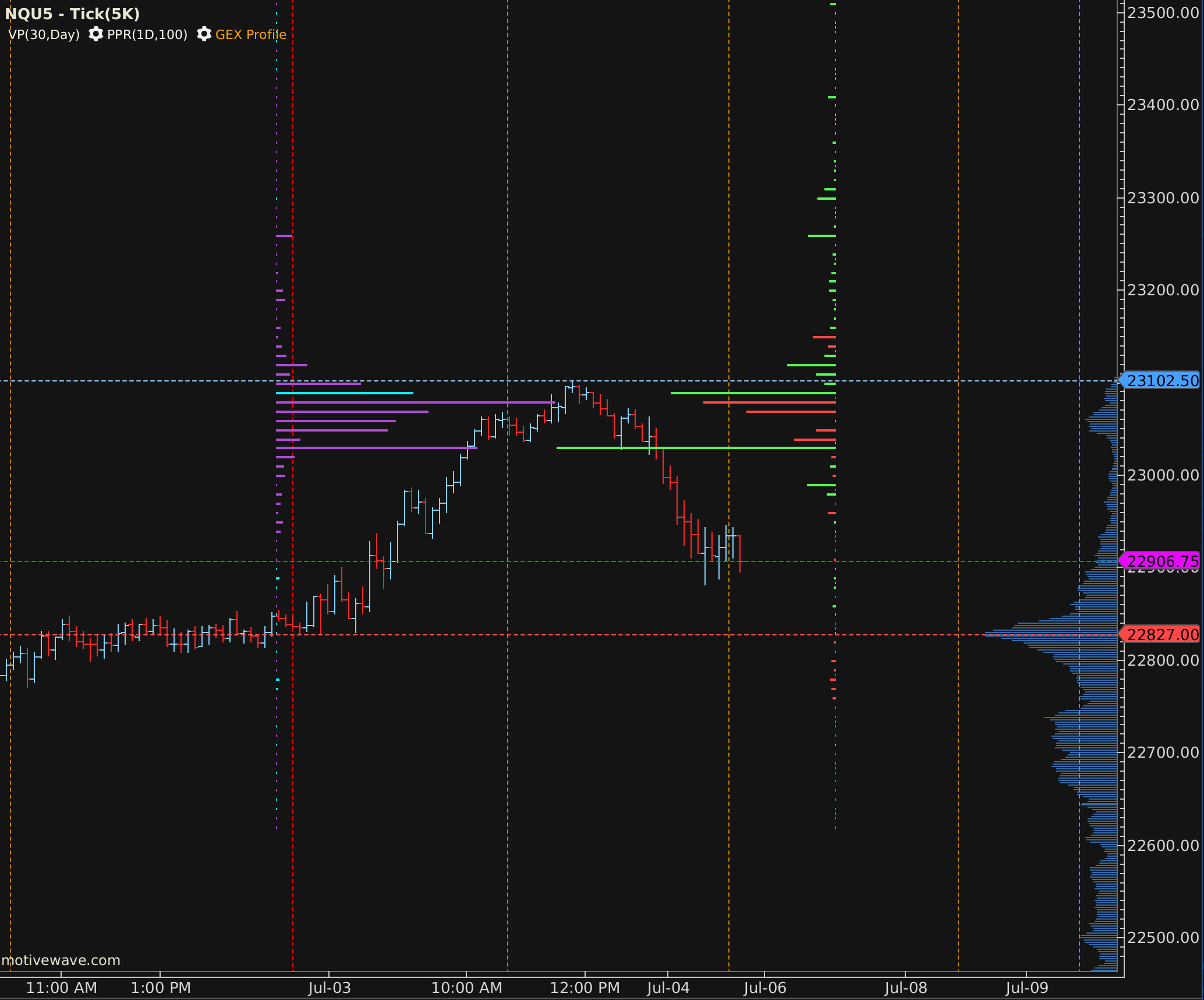
The gexbot MotiveWave study renders real-time GEX and Greek profiles, major levels, and automatic futures conversion directly on your MotiveWave chart.
Requirements
- You need an active gexbot subscription with API access.
- You need your API key. Copy it from Connections.
- You need a matching Java package. gexbot ships a build for each MotiveWave Java runtime, Java 25 and Java 26. Installing the wrong one will fail to load.
Close MotiveWave
Make sure MotiveWave is completely closed before installing or updating the extension.
Download and extract the JAR
Download the package matching your MotiveWave Java runtime and extract the .jar file. You can also find both packages on the official gexbot site at gexbot.com/motivewave, or on the official gexbot Discord.
Install it
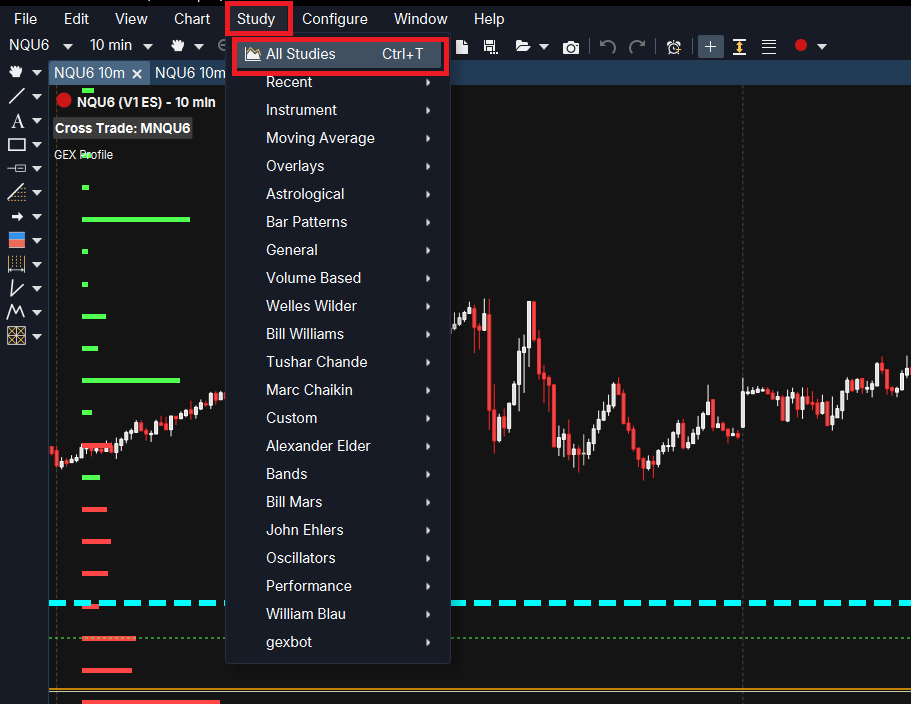
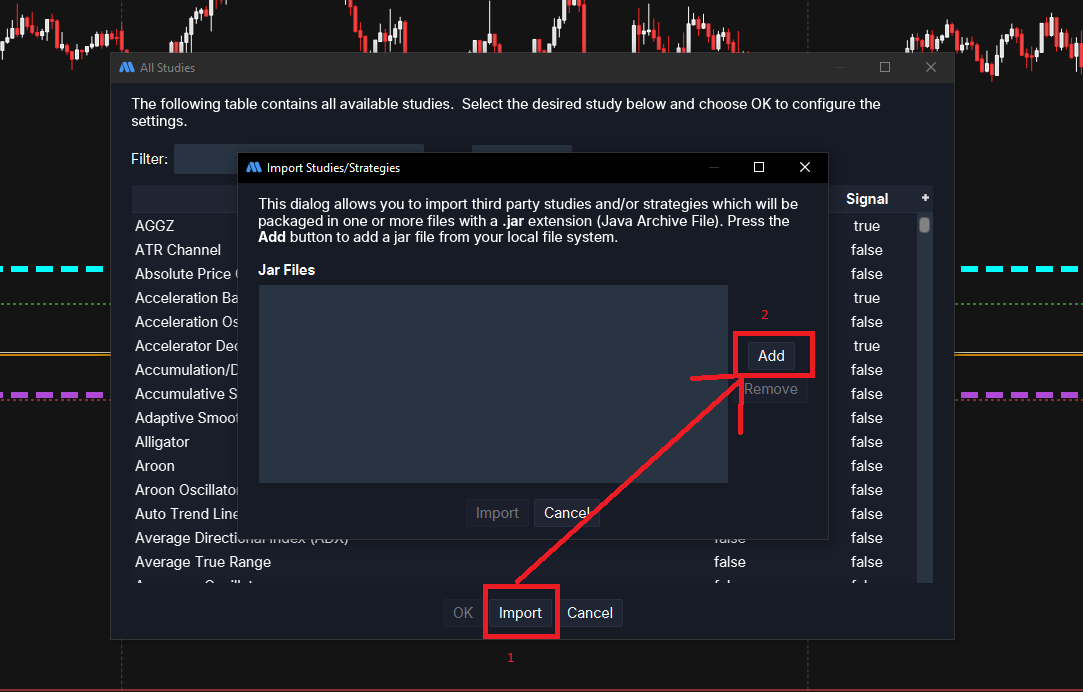
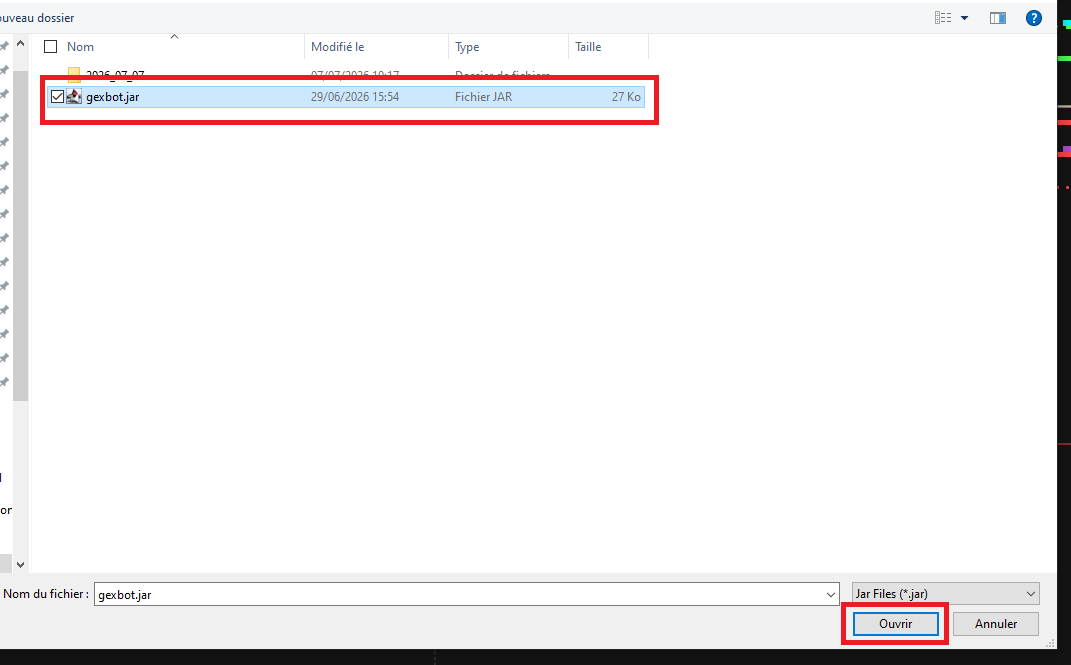
In MotiveWave, go to Study → All Studies, click Import, then click Add, select the .jar file you extracted, and click Open. Back in the Import dialog, click Import to finish.
Launch MotiveWave and add the study
Open a chart, right-click it, select Add Study, search for gexbot, and click Add.
Configure it
Enter your API Key in the study's settings panel and click Apply. Then continue with the Configuration tab above.
Wrong Java package
If the study doesn't appear, or MotiveWave reports a load error, double-check that you installed the .jar matching your installed Java runtime version, either 25 or 26. The two packages are not interchangeable.
Nothing showing up on your chart?
If the study loads but no profile or level appears, see Nothing is showing up on my chart in the FAQ tab above before contacting support.
The study's Settings dialog is organized into tabs that mirror the sections below: General, Call/Put GEX Volume Profile, Call/Put GEX Open Interest Profile, Long/Short Gamma Profile, and Majors.
General — API Settings
| Setting | What it does |
|---|---|
| API Key | Your gexbot API key. Enter it first. Nothing else works without it. |
| Ticker | The symbol requested from the API, for example SPX or NDX. Leave it empty to derive it automatically from the chart's own instrument. An ES chart becomes ES_SPX, and an NQ chart becomes NQ_NDX. For any other instrument, enter the ticker manually, since automatic derivation only covers ES and NQ. |
| Futures Target (Auto-Convert) | The target futures contract for automatic price conversion, for example ES or NQ. Leave it blank to disable. |
| GEX Model | Naive GEX, which is the Classic model combining Volume and Open Interest, or Classified GEX (State Users Only). This setting only controls the Volume profile. See the notes below. |
| GEX by Volume Aggregation Period | 90d agg GEX (full) or 0dte GEX (zero). This is the window used for the Volume profile. |
| GEX by Open Interest Aggregation Period | 90d agg GEX (full) or 0dte GEX (zero). This is the window used for the OI profile. |
| Options Profile (State Users Only) | Which Greek to fetch for the Long/Short Gamma Profile tab. Currently, the only option is Gamma. |
| Strike Multiplier / Strike Additive Offset | An extra manual multiplier and offset applied to every strike, on top of the automatic futures conversion above. Most users leave these at their defaults of 1 and 0. |
Futures conversion cadence
When a Futures Target is set, the conversion refreshes automatically at startup, at 9:30 and 9:32 AM ET, and every 15 minutes after that.
OI and Greek profiles use fixed packages
GEX Model only switches the Volume profile between Naive and Classified GEX. The Open Interest profile always pulls Classic/Naive data (Open Interest doesn't exist in the State package), and the Long/Short Gamma Profile always pulls Classified/State data — regardless of what GEX Model is set to.
RTH-only data
This study only fetches and refreshes live data during the regular cash session, from 9:30 AM to 4:00 PM ET, Monday through Friday. Outside these hours, it will not update.
Call/Put GEX Volume Profile
| Setting | What it does |
|---|---|
| Show Call/Put GEX Profile Bars | Toggles the Volume-based GEX profile, drawn as bars per strike. |
| Profile Width (% of Chart Canvas) | The maximum bar length, as a percentage of chart width. |
| Bar Direction | The direction bars grow from their origin: Left, Right, or Center, where positive values grow to one side and negative values grow to the other, from a center point. |
| Profile Origin Position (% of Chart Canvas) | The horizontal position of the bars' origin point, as a percentage of chart width. |
| Call GEX Bar Color / Put GEX Bar Color | The bar colors for call (positive) and put (negative) strikes. |
| GEX Bar Thickness | The bar thickness. |
Prior Dot Settings
These are small dots plotted at each strike, showing how its GEX value has changed over the last few minutes. They give you a quick way to see where GEX is building up or fading, without waiting for the next refresh.
| Setting | What it does |
|---|---|
| 1 / 5 / 10 / 15 / 30 Minute Positive Color | The dot color when the change over that lookback window is positive. |
| 1 / 5 / 10 / 15 / 30 Minute Negative Color | The dot color when the change over that lookback window is negative. |
| Size | The dot size for that lookback window, from 0 (hidden) to 15. |
Call/Put GEX Open Interest Profile
This profile has the same layout controls as the Volume profile above, but it is based on Open Interest instead. It is independent, so you can show it alongside Volume, for example with Volume aligned left and OI aligned right, for an at-a-glance comparison.
| Setting | What it does |
|---|---|
| Show Call/Put GEX by OI Profile Bars | Toggles this second profile. |
| Profile Width / Bar Direction / Profile Origin Position | The same controls as the Volume profile, adjustable independently. |
| Call GEX by OI Bar Color / Put GEX by OI Bar Color | Dedicated colors, different from the Volume profile by default so the two are easy to tell apart. |
| Bar Thickness | The OI bar thickness. |
Long/Short Gamma Profile
This profile uses the same layout controls again, but for the Greek, meaning Gamma. It only produces data when GEX Model is on the State package, since this profile always fetches Classified GEX data regardless of the GEX Model setting.
| Setting | What it does |
|---|---|
| Show Long/Short Gamma Profile Bars | Toggles the Greek profile. |
| Profile Width / Bar Direction / Profile Origin Position | The same controls as the other two profiles, adjustable independently. |
| Long Gamma Bar Color / Short Gamma Bar Color | The bar colors for the long (positive) and short (negative) side of the Greek. |
| Bar Thickness | The bar thickness. |
Prior Dot Settings
This works the same way as the GEX profile's prior dots, but for the Greek profile. Only the 5, 15, and 30 minute lookback windows are available here.
| Setting | What it does |
|---|---|
| 5 / 15 / 30 Minute Positive Color | The dot color when the change over that lookback window is positive. |
| 5 / 15 / 30 Minute Negative Color | The dot color when the change over that lookback window is negative. |
| Size | The dot size for that lookback window, from 0 (hidden) to 15. |
Majors
Each of the seven major levels below has one combined control, MotiveWave's native line editor, covering color, line style, width, and visibility. Click a line's swatch in Settings to open the full editor.
| Line | Plots | Available in | Default color |
|---|---|---|---|
| Major Call GEX by Volume | Major positive Volume GEX level | GEX Volume Profile | Green |
| Major Put GEX by Volume | Major negative Volume GEX level | GEX Volume Profile | Red |
| Zero Gamma | The zero gamma flip level | GEX modes | Orange |
| Major Call GEX by OI | Major positive Open Interest GEX level | Classic/Naive only | Green |
| Major Put GEX by OI | Major negative Open Interest GEX level | Classic/Naive only | Red |
| Major Long Gamma | Major long gamma level | Long/Short Gamma Profile | Aqua |
| Major Short Gamma | Major short gamma level | Long/Short Gamma Profile | Purple |
Quick Settings
MotiveWave's Quick Settings panel, opened by right-clicking the study and selecting Quick Settings, exposes the most commonly changed options without opening the full Settings dialog. This includes the API Key, GEX Model, Options Profile, Strike Multiplier and Offset, the three "Show" toggles, and all the bar alignment and position controls.